
Looking for pruned snapshots or validator recovery? See the Validator Troubleshooting Guide for pruned snapshot resources and coordinated security upgrade recovery procedures.
Restoring after an upgrade or halt? Skip to Restoring Archival Nodes After an Upgrade or Halt for recovery procedures.
Archival Setup
To make serving archival data more accessible we split the data into smaller segments. These segments are stored ins3://injective-snapshots/mainnet/subnode
The bucket is publicly accessible. No AWS credentials are required:
Naming convention
Directory names encode the block height range in millions. For example,138150 contains blocks from 138M to 150M. Where segments overlap (e.g., 8896 vs 8898, or 119127 vs 119141 vs 119143), the newer or wider segment typically includes corrections or extends coverage. Pick the segment that best covers your target range without unnecessary overlap.
Available segments
This table may not include the latest segments. Run the
aws s3 ls command above to check for newly published segments.Choosing segments for full coverage
Several segments overlap in height range. You do not need all of them. Here is a recommended minimal set for full archival coverage from genesis to the current chain tip:
The pruned tip node is essential. Archival segments are static snapshots that do not sync with the live chain. The gateway routes queries for recent blocks to the pruned node, which stays synced via p2p. See the gateway config below for how to configure the tip node with
blocks: [1000].
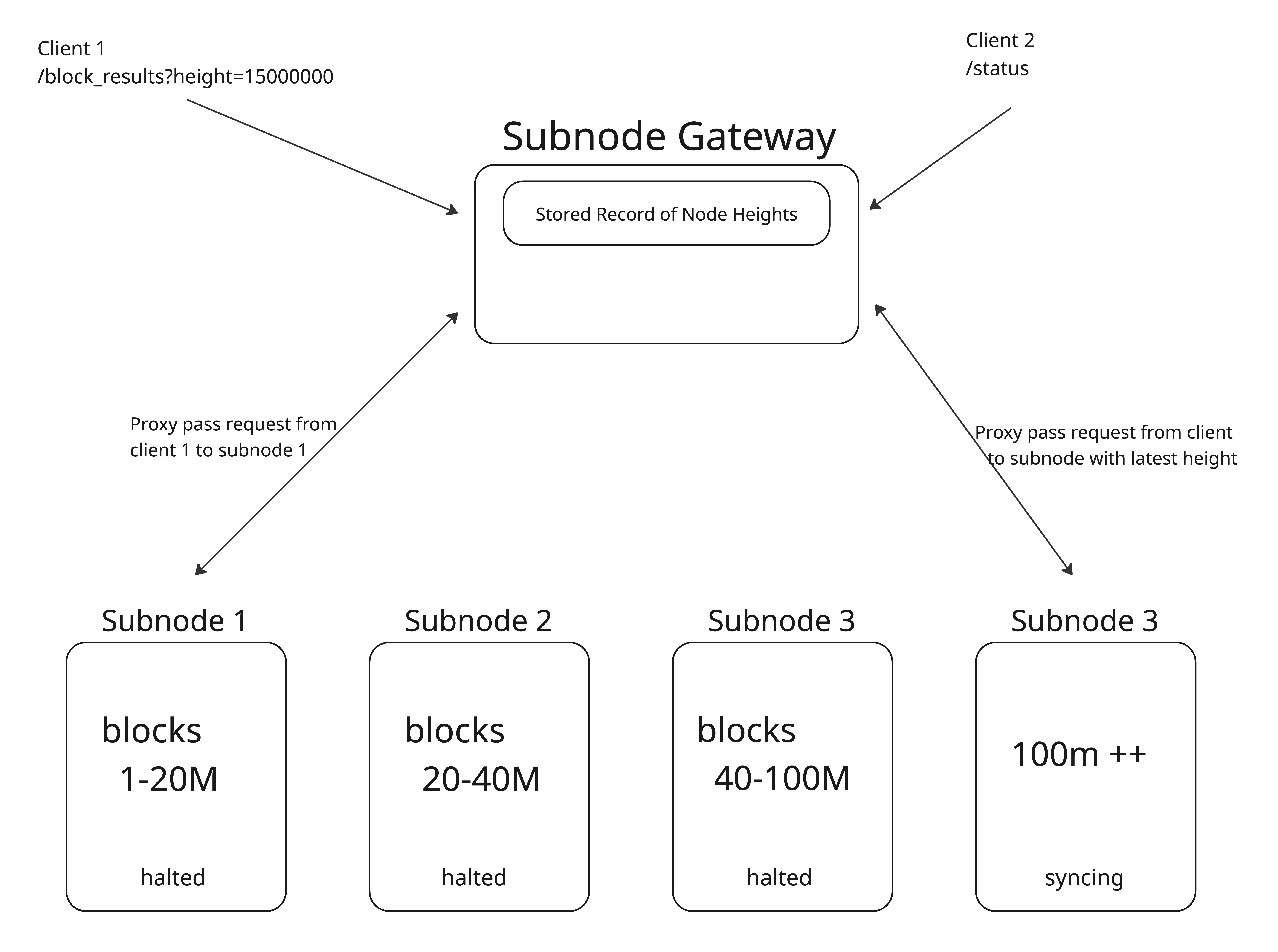
These segments are stitched together via gateway which is an aggregator proxy that routes queries to the appropriate node based on block range
System Requirements
Each node hosting a slice of archival data should have the following minimum requirementsSetup Steps
On each node hosting an archival segment:
1. Download the archival segments with the history your setup requires using
2. Download or set the appropriate injective binary or image tag based on the table above
3. Generate your config folder
4. Disable pruning in your app.toml file and block p2p and set the log level to error in your config.toml files.
This ensures that the data does not get pruned and the node stays in a halted state. Setting the log level to error lessens disk ops and improves performance.5. Run your node
Gateway configuration
Gateway is a reverse proxy that routes RPC, gRPC, and API queries to the correct archival node based on the requested block height. The reference implementation below is from Decentrio, an ecosystem contributor.Gateway it inspects incoming requests, determines the block height, and forwards to the upstream node that holds that range. Any height aware reverse proxy (nginx, Caddy, HAProxy with custom routing) can serve the same purpose.
1. Clone the gateway repository
2. Build gateway
3. Create your config file
4. Run Gateway
Restoring Archival Nodes After an Upgrade or Halt
Archival segment nodes are static so they do not participate in consensus or sync via p2p. However, they can still be affected by coordinated upgrades or unscheduled chain halts, particularly the pruned tip node and any segment nodes that cover recent block heights.Pruned tip node
The pruned tip node is the only node in the archival fleet that actively syncs with the live chain. During a coordinated upgrade or unscheduled halt, treat it the same as any other full node:- Stop the node
- Swap to the new binary
- Verify:
injectived version - Start the node
priv_validator_state.json (it is not a validator), so there is no double-signing risk. If the tip node’s state is corrupted (AppHash mismatch), restore it from a pruned snapshot. See Validator Troubleshooting & Snapshot Resources.
Segment nodes covering recent heights
If an upgrade changes how historical blocks are processed or stored (a state migration that affects query results), segment nodes covering heights near the upgrade boundary may return inconsistent data. In this case:- Stop the affected segment node
- Download the updated segment from S3 (the infra team may publish a corrected segment after the upgrade):
- Update the binary to the version specified for that segment
- Restart the node
Older segment nodes
Segment nodes covering historical block ranges (0073, 8088) are generally unaffected by chain upgrades. They serve pre-existing data with the binary version that produced it. No action is needed unless the upgrade explicitly changes how historical queries are handled.